Beginner's Guide to Landing Pages: What Works in 2026
 Saku Koskinen27 Jan 2025 · Updated 29 Oct 2026· 7 min read
A landing page is a single web page built for one audience and one action, usually the page your Google or Meta ad sends people to. The best landing pages match the ad that brought the visitor in, explain the offer in plain words, prove it with real evidence and ask for one clear next step. This guide covers what a landing page is, why it matters for lead generation and how to build one that converts in 2026.
I've designed and built more than 200 websites and landing pages since 2019, mostly for small businesses running paid ads. The same handful of principles make the difference every time, and none of them need a big budget.
What is a landing page?
A landing page is where a visitor "lands" after clicking a link in an ad, an email or a social post. Unlike the rest of your website, it has one job: get the visitor to take a single action. That might be booking a call, requesting a quote, downloading a guide or buying a product.
Landing page vs homepage
Your homepage talks to everyone. It has a menu, links to every service and several possible next steps. That's right for people browsing, but it's a problem when you've paid for a click from someone searching for one specific thing.
A landing page strips that away. It speaks to one type of customer about one offer, and every section moves them towards the same button. If you sell three services, you'll usually get better results from three landing pages than from sending all your ad traffic to the homepage.
The two main types
- Lead generation pages collect contact details with a form, in exchange for a quote, a call, a consultation or a free resource. Most service businesses use these.
- Sales or click-through pages sell a product, or warm people up and send them to a checkout. Ecommerce brands and online courses use these.
Why landing pages matter for lead generation
A focused page does three useful things for a small business.
It turns paid clicks into enquiries
When the page matches what someone searched for, they don't have to hunt for the answer. They read, they trust, they act. For a sense of what's typical, Unbounce's 2024 Conversion Benchmark Report, which analysed more than 41,000 landing pages, found a median conversion rate of 6.6% across industries. Treat that as a rough reference point, not a target: a page for an emergency plumber and a page for a $20,000 renovation will never convert at the same rate.
It helps your Google Ads perform
Google Ads rates each keyword with a Quality Score, and one of its three components is landing page experience, which Google describes as "how relevant and useful your landing page is to people who click your ad." A relevant page is one of the few levers you control that helps your ads and your conversion rate at the same time. If you're setting up ads for the first time, my guide to launching your first Google Ads campaign walks through the rest.
It tells you who your leads are
A well-chosen form question or two (for example, "What's your project timeline?") helps you qualify leads before you pick up the phone. Over time, the data shows which offers, ads and audiences bring in the best enquiries, so you can put more budget behind what works.
The anatomy of a landing page that converts
Every high-performing landing page I've built has most of these elements, roughly in this order.
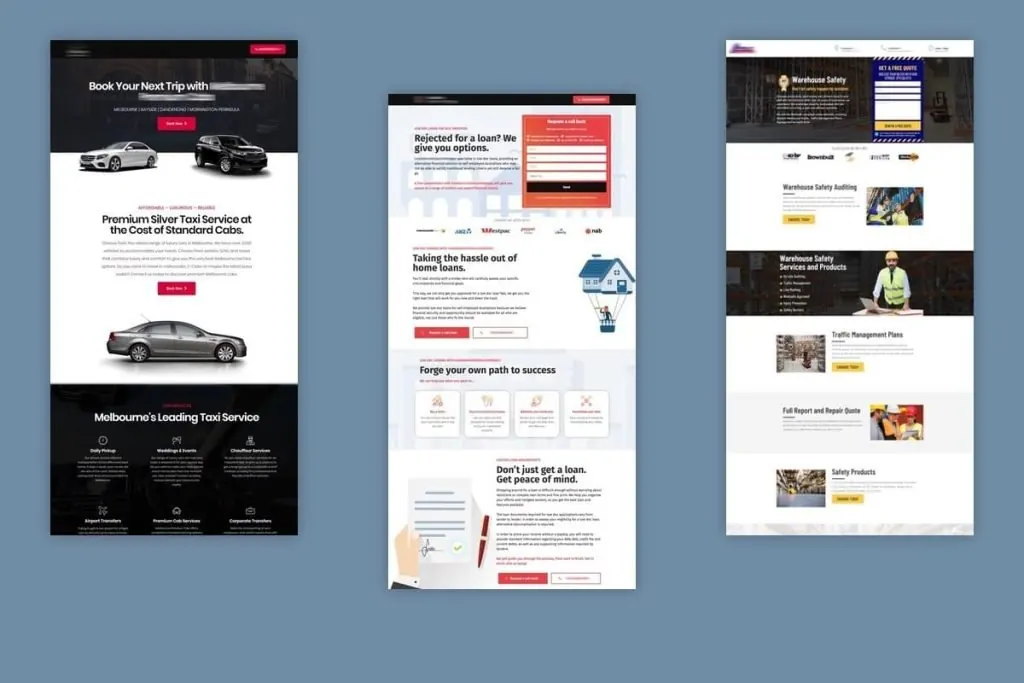
1. A headline that matches the ad
If your ad says "Same-day hot water repairs in Melbourne", your headline should say the same thing. This is called message match, and it reassures the visitor in the first second that they're in the right place. State the outcome they want, not your company name. For more on this, see how to write headlines your readers can't resist.
2. A subheading that explains the offer
One or two sentences on what you do, who it's for and what happens next. Plain words beat clever ones.
3. Benefits, presented so they can be scanned
People skim. Use short bullet points, small headings and simple icons so the main benefits can be taken in at a glance. Lead with what the customer gets (less hassle, a faster result, a lower bill) rather than a list of features.
4. Proof
Reviews, star ratings, before-and-after photos, logos of clients you've worked with, and specific results. Real proof does more than any adjective. Put a short testimonial near the form, where doubt is highest.
5. One clear call to action
Choose one action and repeat the same button throughout the page. Use a verb that describes what happens: "Get my free quote" or "Book a 15-minute call" works better than "Submit". Remove the main menu if you can, so there are fewer exits.
6. A short form
Ask only for what you need to follow up. Name, phone or email, and one qualifying question is enough for most service businesses. Every extra field is one more reason to stop.
7. Answers to common objections
A short FAQ near the bottom handles the questions that stop people enquiring: price range, timing, service area, what happens after they submit the form.
Match the page to how ready your visitor is
A common mistake is asking cold visitors to buy before they're ready, or making warm visitors wade through information they don't need.
- Cold visitors (from social ads or broad searches) don't know you yet. Give them more context and proof, and consider a smaller first step, such as a free guide, checklist or short consultation.
- Warm visitors (searching for your exact service, or returning from your email list) are ready to act. Put the call to action at the top and keep the page short.
Lead magnets for colder traffic
A lead magnet is something useful you give away in exchange for an email address: a checklist, a short guide, a price guide or a recorded webinar. It works best when it solves a small, specific problem related to what you sell. Once someone downloads it, follow up with helpful emails that lead towards a conversation.
Write it so anyone can read it
Simple writing converts better. In the same Unbounce report, pages written at a 5th to 7th grade reading level converted at 11.1%, compared with 5.3% for pages written at a professional level. Use short sentences, everyday words and one idea per paragraph. If you're writing the copy yourself, my guide on how to write landing page copy that sells goes step by step.
Design for mobile first
Most of your visitors will arrive on a phone. Unbounce found that 83% of the visits it analysed came from mobile devices, yet desktop visitors converted 8% better on average. That gap is your opportunity. On mobile:
- Keep the headline, a key benefit and the button visible without scrolling.
- Use large buttons that are easy to tap with a thumb.
- Make phone numbers tappable and keep forms to as few fields as possible.
- Compress images so the page loads quickly on a mobile connection.
Measure, test and improve
A landing page is never finished. Set up tracking from day one, then improve it in small steps.
Track the right actions
In Google Analytics 4, mark form submissions and calls as key events, the term GA4 now uses for the actions that matter most to your business. Import them into Google Ads as conversions so your campaigns can optimise for real enquiries rather than clicks.
Test one change at a time
Start with the elements that matter most: the headline, the offer and the call to action. Change one thing, give it enough traffic to judge, then keep the winner. When I rebuilt the landing page and Google Ads for a local electrical contractor, the page converted at 18.6% over a five-month period. That result came from the basics in this guide done consistently, not from tricks.
Your landing page checklist
- One audience, one offer, one call to action
- Headline matches the ad or link that brought people in
- Benefits are easy to scan
- Real proof: reviews, results, client logos
- Short form, with one qualifying question at most
- Common objections answered on the page
- Fast and easy to use on a phone
- Form submissions and calls tracked as key events
Frequently asked questions
What is the difference between a landing page and a website?
A website covers your whole business and lets people explore. A landing page is one page with one goal, built for a specific campaign or audience. Most businesses need both.
What do the best landing pages have in common?
They match the ad that brought the visitor in, explain the offer in simple words, show real proof and ask for one clear action. They also load quickly and work well on a phone.
How many landing pages do I need?
Start with one page for each main service or offer you advertise. If you target very different audiences, such as homeowners and commercial clients, give each its own page so the message fits.
If you'd like a landing page built around your offer and your ads, take a look at my landing page design and development service. Or book a free call and we'll look at what your current page could do better.
Websites that turn traffic into qualified enquiries.
Freelance digital marketing consultant in Melbourne. Since 2019 I've built websites, ads and campaigns for 100+ Australian businesses.